September 16, 2026
Your coach belongs on your wrist between sets
You finish a set and put the weight down. The next minute should be simple: record what happened, recover, and get ready to continue.
Instead, the phone is inside your bag. Or under a towel. You take it out, unlock it, find the open session, enter the set, check what comes next, and put it away again. None of those actions is difficult. Repeating them after every set is enough to pull attention away from the workout.
That small gap is where a coach on your wrist becomes useful.
TL;DR
Between sets, Ollim keeps the next target, set logging, and the rest timer on Apple Watch. The goal is not to shrink the entire iPhone app onto your wrist. It is to keep the next useful decision available without making the phone part of every set.
The useful window is short
Between sets, you do not need the full history of your program. You need to know what you just did, what comes next, and whether it is time to start again.
That is a narrow window. Your attention may still be on the weight, your breathing, the equipment, or whether the next station is free. A watch interaction has to fit inside that reality. If it asks for several screens of reading or careful navigation, it has already missed the moment.
The design rule is simple: give the wrist only the job that belongs between sets.
Show the target before asking for input
Before a set, Ollim shows the exercise, set position, target weight, and target repetitions on the watch. The target is already there when you raise your wrist. You do not have to reconstruct the plan from memory before deciding what to do.
A target is not a command, and it does not guarantee how the set will go. It is a reference point. Maybe you complete every repetition. Maybe the available equipment changes, or the set ends early. Either way, starting from one concrete target is clearer than reopening the entire plan.
Logging closes the loop
The target only describes what was planned. The completed set describes what happened.
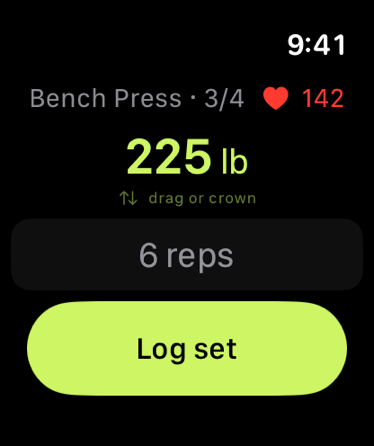
Ollim lets you adjust the weight or repetitions on the watch and log the set from the same screen. That creates a small but complete loop: see the target, do the work, record the result. The next decision can now begin with evidence instead of a vague memory that the workout felt fine.
The interaction is deliberately brief. Logging should not become a second task layered on top of training. It should preserve the few facts the session needs while they are still easy to recall.
Rest is part of the session
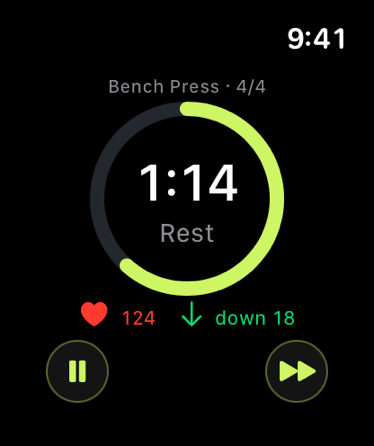
After the set is logged, the watch moves to the rest timer. The timer keeps the transition visible, with controls to pause or move on when the situation calls for it.
This is not a claim that one rest duration is correct for every exercise or every person. The useful part is continuity. The completed set does not disappear into a log while you wonder what happens next. The session moves into recovery, then back toward the next set.
Apple's workout-session model supports this kind of ongoing experience on Apple Watch: an active session can continue collecting workout information in the background and return when the wrist is raised. Ollim uses that platform context so the current workout remains close without requiring the phone to stay in your hand.
Keep the phone for the wider view
The watch is not where the whole program needs to live. The iPhone remains better for reviewing the session, understanding the exercise list, looking through training history, and seeing progress across time.
That separation matters. Putting every phone feature on the watch would make the smaller screen busier without making the between-set decision clearer. The phone holds the wider view. The watch keeps the immediate loop moving.
The result is not less coaching. It is coaching placed closer to the moment when it can help: before the set, immediately after it, and through the short recovery before the next one.
Leave the phone in the bag for one set. Raise your wrist, follow the target, record what happened, and let the timer carry you forward.
Keep the next decision close.
Sources
- Workouts and activity rings, Apple Developer Documentation.
- Running workout sessions, Apple Developer Documentation.